IoT Experimentation
Overview
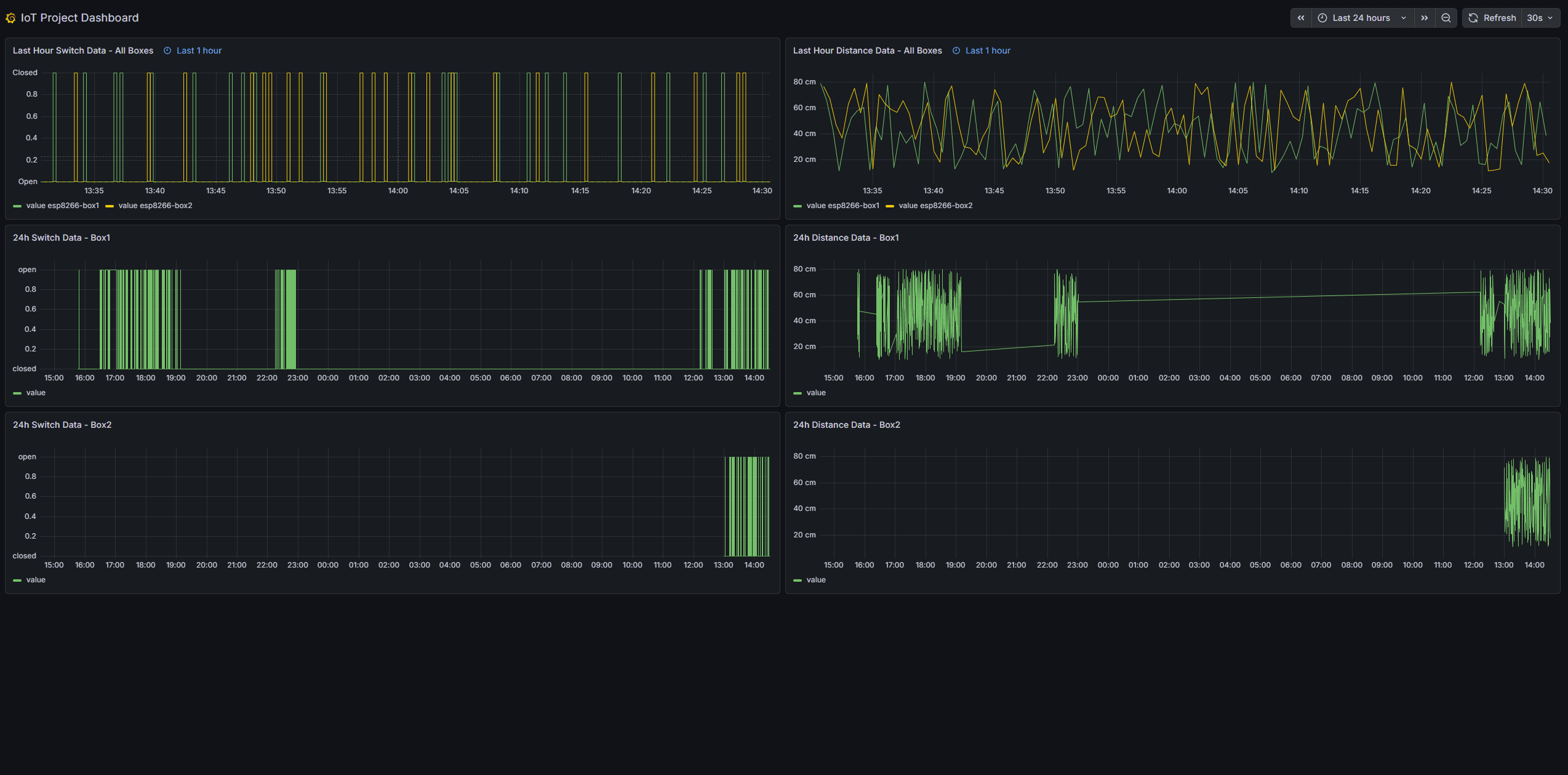
An ESP8266 D1 Mini microcontroller reads sensor data on a configurable interval and ships it through a cloud-native AWS pipeline to InfluxDB and Grafana. A PC-based simulator is included so the pipeline can be tested without physical hardware.
Showcase
Tech Stack
- Device: ESP8266 D1 Mini (MicroPython)
- Sensors: SHARP 2Y0A21 IR distance sensor, digital switch
- Transport: MQTT over TLS (AWS IoT Core)
- Pipeline: AWS IoT Core -> Kinesis Data Streams -> Lambda (Python)
- Storage: InfluxDB Cloud Serverless
- Visualisation: Grafana Cloud
- Infrastructure: Terraform (AWS provisioning)
- Laravel API: Parallel HTTP POST to a Laravel backend for comparison/original path
Hardware
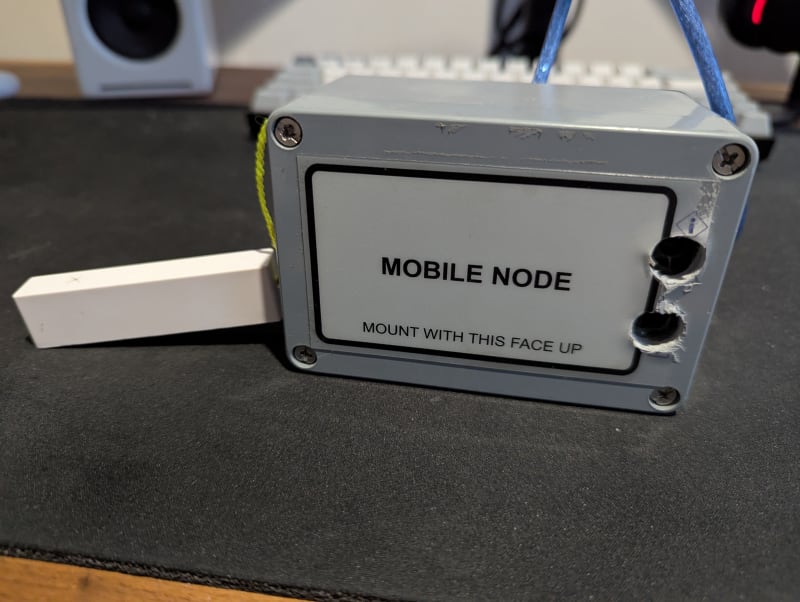
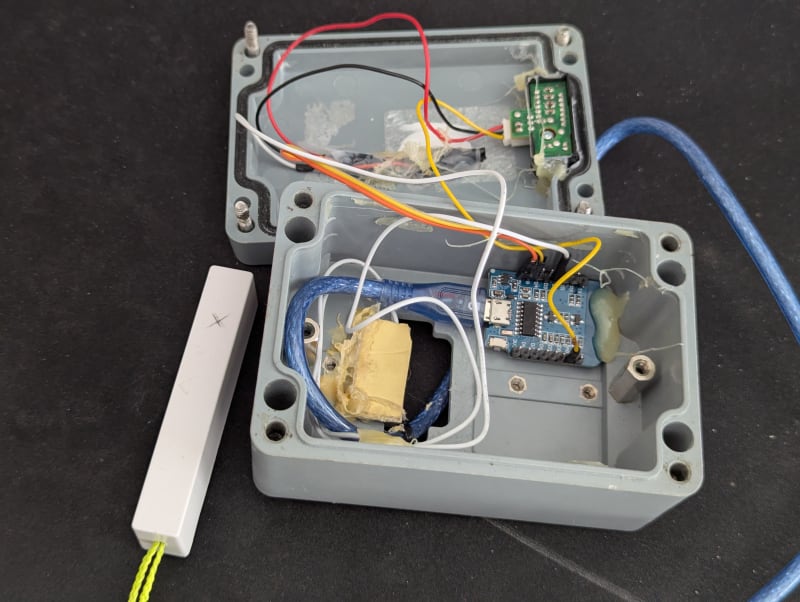
The physical setup uses an ESP8266 D1 Mini as the microcontroller, running MicroPython. Two sensors are wired up: a SHARP 2Y0A21 infrared distance sensor which outputs an analogue voltage that maps to distance, and a simple digital switch. Both are read every 30 seconds and the readings are packaged into an MQTT payload for the cloud pipeline.
Project Origins
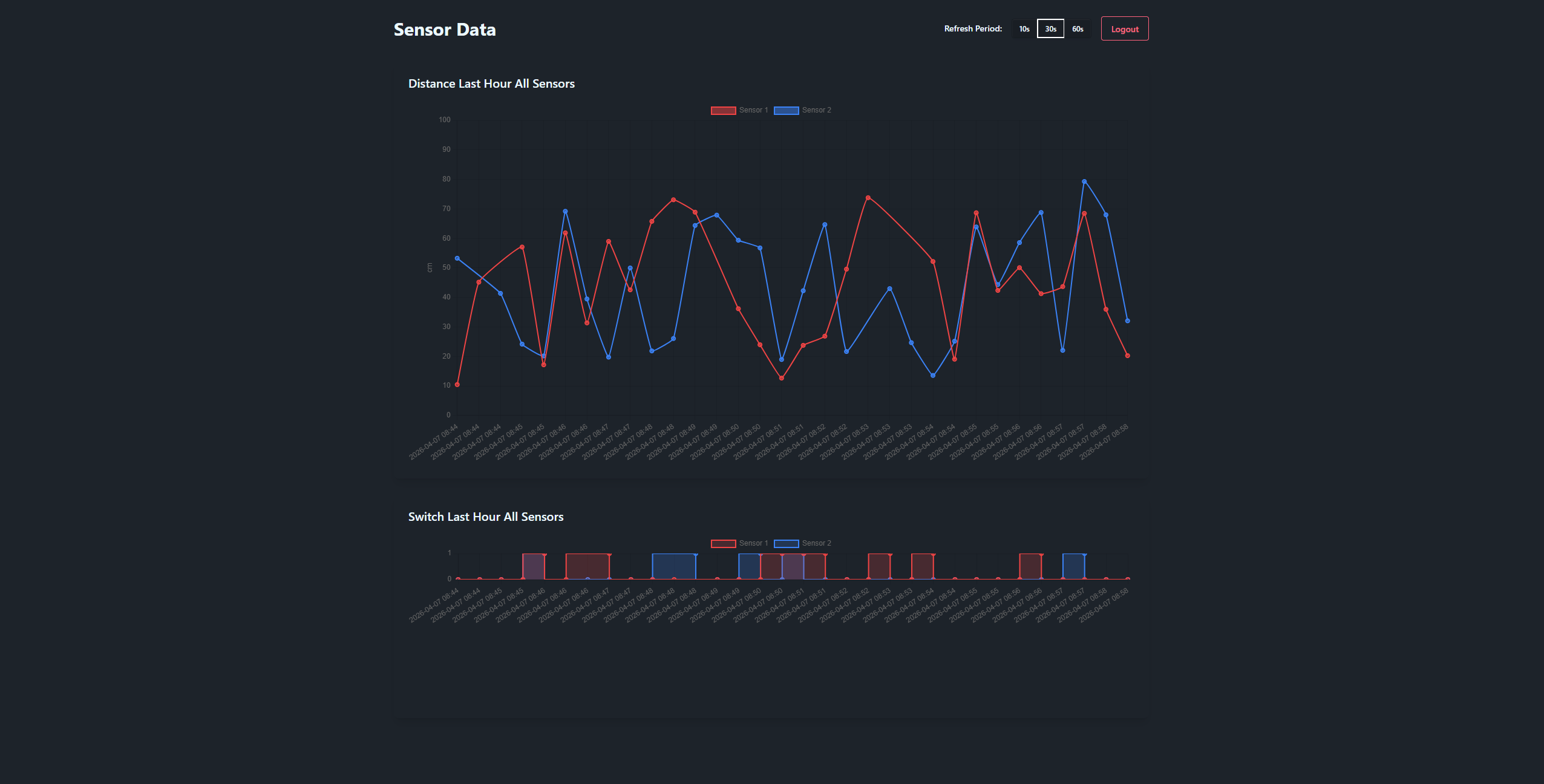
This project began as a learning exercise with my friend Hiroshi Ransom, exploring core IoT concepts: sending sensor data from a microcontroller to a backend and visualising it in a web page. I was learning Laravel at the time, so it made a natural choice for the backend API. Livewire was a good fit for the frontend, as its built-in polling and component-driven design suited a dashboard layout better than standard Blade templates. We initially used a Raspberry Pi with a wired connection, but later moved toward a wireless "IoT box": an ESP8266 in a custom enclosure to better simulate a real field device.
The ESP8266 POSTs sensor readings directly to a Laravel REST API, which stores them in a database and surfaces them through a Livewire dashboard with live-updating charts (username: test@test.com, password: hiroluke123).
Cloud Native Upgrade
After getting my AWS Cloud Practitioner certification I wanted to apply that knowledge to something practical. Extending this project into a cloud-native pipeline felt like a natural next step, as it aligns more closely with how IoT devices are managed at scale in industry. It gave me a reason to explore AWS IoT Core, Kinesis, and Lambda together in a real pipeline rather than just reading about them. The AWS pipeline and Grafana Cloud are now provisioned through Terraform, making the infrastructure reproducible and version controlled. InfluxDB remains manually configured as no suitable Terraform provider was available.
Architecture
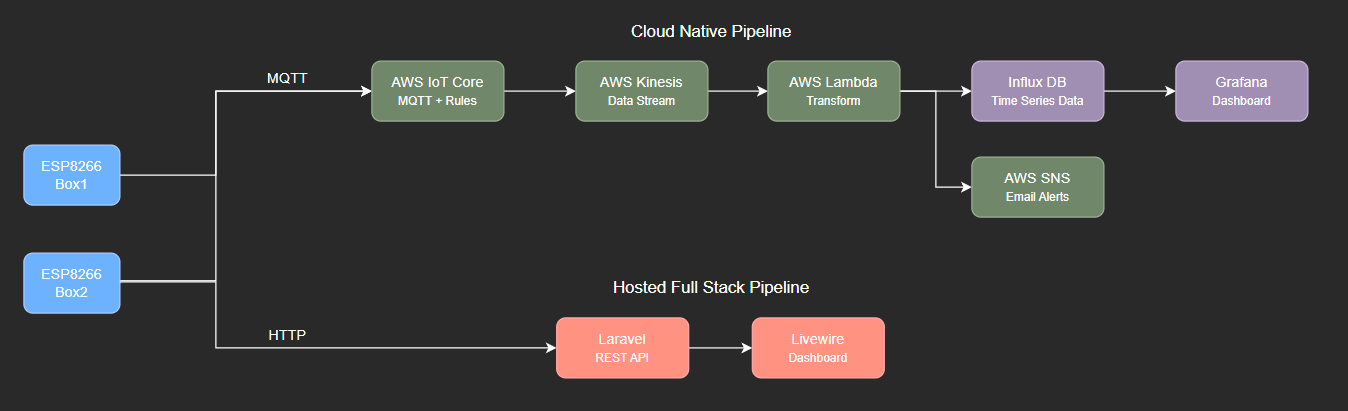
The pipeline is designed to support multiple devices, with each device publishing MQTT payloads to AWS IoT Core, identified by its own topic. An IoT Core rule forwards every message to a Kinesis stream, a Lambda function consumes the stream, converts payloads to InfluxDB line protocol, and batch-writes to InfluxDB Cloud. Grafana sits on top of InfluxDB for dashboarding, with readings partitioned by device ID so each device can be tracked independently. Devices also POST directly to a Laravel API, the original integration that predates the AWS pipeline and runs in parallel.
Note: Kinesis is currently commented out in the Terraform configuration to save cost, as a provisioned shard runs around $11/month even when idle. All other services in the pipeline are comfortably within their free tiers at the project's data rates. IoT Core temporarily invokes Lambda directly instead, and Kinesis can be reintroduced by uncommenting the relevant resources and re-applying the Terraform config.
Cloud Setup (Provisioned via Terraform)
AWS IoT Core
- Region:
ap-southeast-2 - Things:
iot_box1andiot_box2(created viafor_eachoverlocal.box_ids) - Per-box policies
iot_box1_policy/iot_box2_policyallow Connect and Publish oniot_<box>/* - Certificates auto-generated by Terraform, written to
certs/iot_<box>.pem/.keyas PEM (PKCS#1 DER conversion for axTLS happens outside Terraform) - IoT Rules
iot_box1_kinesis/iot_box2_kinesis:SELECT * FROM 'iot_<box>/#'-> Kinesis
Kinesis
- Stream:
iot_box_kinesis_stream, provisioned, 1 shard, 24h retention - Partition key:
${topic()}
Lambda
- Function:
iot_lambda_function, Python 3.14 - Trigger: Kinesis stream, batch size 10, TRIM_HORIZON
- CloudWatch log group
/aws/lambda/iot_lambda_function, 1-day retention - Decodes base64 Kinesis records, converts to InfluxDB line protocol, batch POSTs via urllib
- Env vars:
INFLUXDB_URL,INFLUXDB_TOKEN,INFLUXDB_ORG,INFLUXDB_BUCKET
InfluxDB Cloud Serverless
- Org/bucket configured via tfvars (
influxdb_org,influxdb_bucket) - Measurement:
sensor_readings, tags:device_id/sensor_type/unit, field:value - Timestamp from payload
measured_at, falling back to Lambda arrival time
Grafana Cloud
- Data source:
InfluxDB-IoT(InfluxDB plugin, SQL mode, POST) - Dashboard provisioned from
iot_dashboard.jsontemplate, overwrite enabled - Public dashboard enabled with time selection
Challenges & Learnings
TLS on the ESP8266
Getting mTLS working with AWS IoT Core on the ESP8266 was the most frustrating part. AWS generates certificates in PKCS#8 format by default, but the ESP8266's SSL implementation is built on axTLS — a minimal library that only supports RSA keys in PKCS#1 DER (binary) format. The connection would silently fail until I realised the certificates needed to be repackaged with OpenSSL before flashing them to the device.
Even once connected, the TLS handshake is painfully slow. A 2048-bit RSA handshake on this hardware takes around 50 seconds. On top of that, MicroPython's axTLS configuration doesn't validate certificates, which leaves connections open to man-in-the-middle attacks. For a learning project sending sensor data this is fine, but for anything more serious an ESP32 or similar would be a much better starting point.
Memory Constraints and MicroPython
Coming back to embedded development after a while away, the memory limitations of the ESP8266 took some readjusting to. The device has around 80KB total RAM of which 30-50kb is usable after MicroPython is loaded. If you're not careful with object lifetimes the heap fragments quickly and you start getting memory allocation errors mid-run.
The main tool for dealing with this is calling gc.collect() manually at key points in the loop - after closing a connection, after processing a payload, before opening a new one. MicroPython doesn't garbage collect as aggressively as you might expect, so being explicit about it makes a real difference to stability.